




What sender reputation means
Sender reputation is how much Gmail, Yahoo, Outlook and Apple trust you. They watch how people react to your emails and how you send them. Then they pick where your email goes: the main inbox, the Promotions tab, spam, or nowhere.
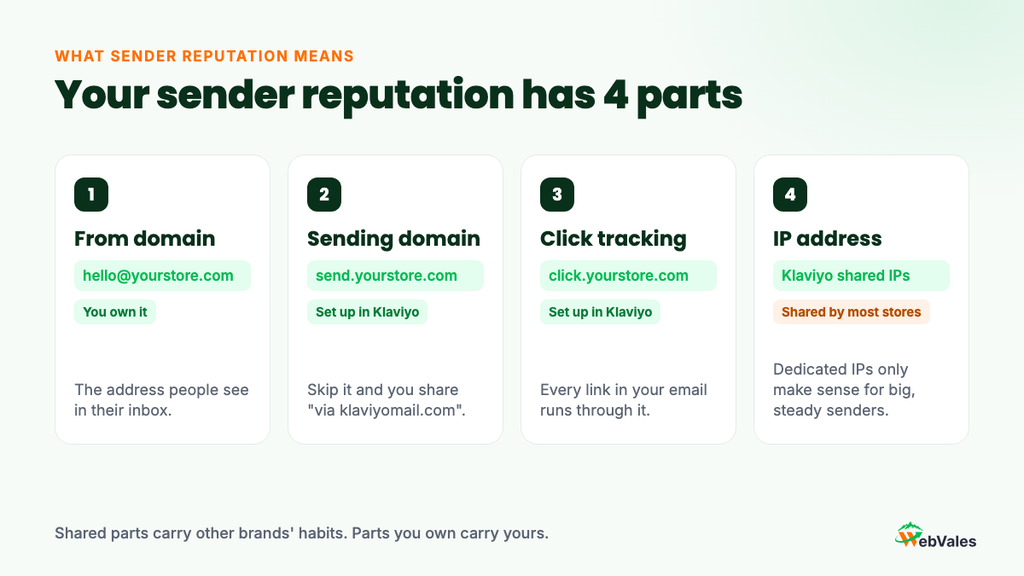
Each part of your setup has its own score. That includes your From domain (yourstore.com), your sending domain in Klaviyo (like send.yourstore.com), your click tracking domain, and the IP address. If you never set up a branded sending domain, you’re on Klaviyo’s shared one, and people see “via klaviyomail.com” next to your name. Fixing that is step one for most stores.
Here we will discuss the 4 things inbox providers judge you on
1. Who you send to and how they react
This matters most. When people open, click and buy, inbox providers learn that people want your email. When people ignore you or hit “Report spam,” your reputation drops.
Build engaged segments in Klaviyo for 30, 60, 90 and 180 days, and send most of your campaigns to them. Don’t build them on opens alone. Apple Mail Privacy Protection marks lots of emails as “opened” even when nobody read them. Use clicks, site visits and orders too.
For pet stores:
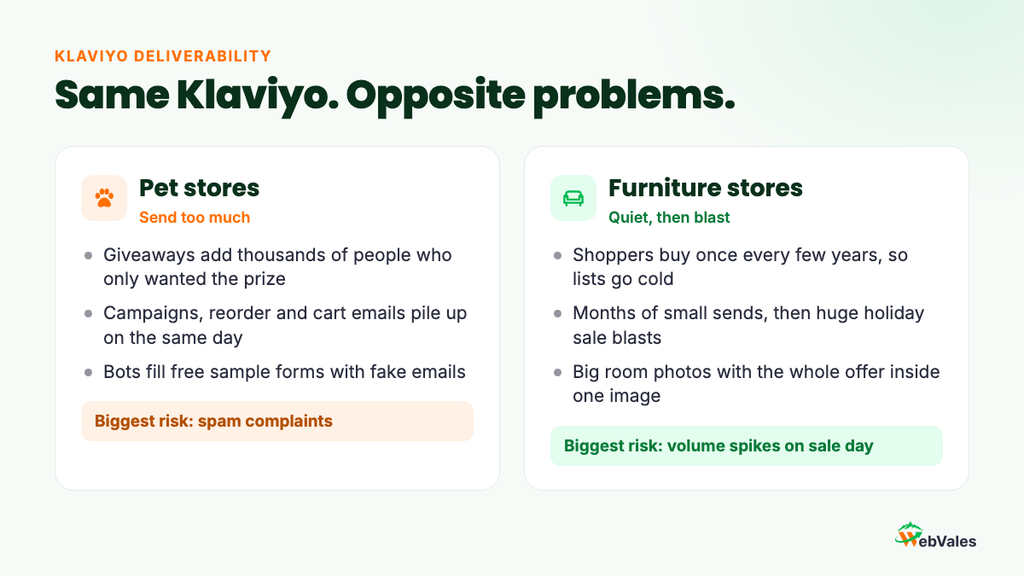
- Be careful with giveaway sign-ups. A “win a year of free food” contest can add 20,000 people in a week. Many only wanted the prize. Put them in their own segment and send them a short welcome series first. Only move the ones who click into your main sends.
- Watch for bots on free sample forms. If sign-ups jump and none of the new profiles visit your store, bots are filling your form. Double opt-in fixes this.
- Let people tell you their pet passed away. Nothing gets a spam report faster than a birthday email for a dog that died last month. Add a simple option in your preference page and take those profiles out of pet-specific flows right away.
For furniture stores:
- Count browsing as engagement. Someone shopping for a sofa may not click an email for weeks, but they keep viewing products on your site. Add “Active on Site” and “Viewed Product” to your engaged segments so you don’t cut real shoppers.
- Slow down after a big purchase. Someone who just bought a dining table won’t buy another one next week. Move recent buyers into post-purchase flows and a lighter campaign schedule.
- Don’t upload showroom or delivery lists without consent. Getting an email for delivery is not the same as saying yes to marketing. Those uploads bring complaints and bad addresses.
For both: suppress people who never engage. Klaviyo’s rule is anyone who got at least 5 emails in the last 180 days and never opened, clicked or ordered. You can suppress that whole segment at once from its menu.
2. How much and how often you send
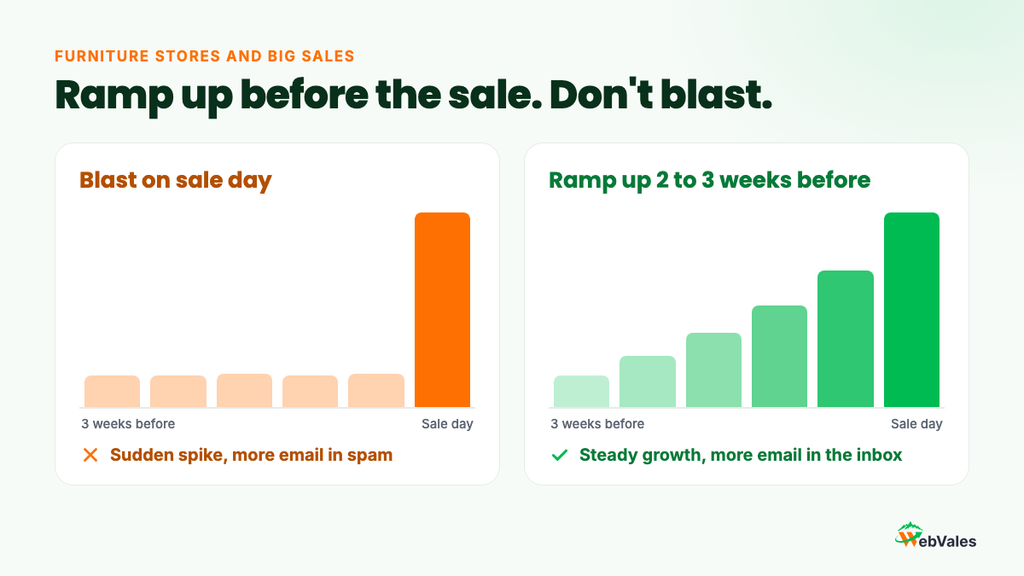
Inbox providers like a steady pattern. A sudden jump in volume looks strange, even from a real brand.
Furniture stores have this problem many times a year. Presidents Day, Memorial Day, July 4th, Labor Day and Black Friday are your biggest weekends. The usual mistake is to send to 25,000 engaged people for months, then send to 150,000 on sale day. Gmail sees a huge spike to people who haven’t heard from you in a long time, and a lot of that email goes to spam on the day you need it most. Start adding less engaged people 2 to 3 weeks before each sale, a little more each send.
Pet stores have the opposite problem: too much email. A customer can get a campaign, a reorder reminder, a review request and a cart reminder in one day. Keep Smart Sending on for marketing emails. By default it skips anyone who got an email from you in the last 16 hours. Turn it off for order and shipping emails.
For both, send more to engaged people and less to everyone else. Klaviyo’s warming guide uses this pace: 60-day engaged up to 3 times a week, 90-day up to 2 times a week, 120-day once a week, 180-day once a month.
3. What’s inside your email
Spam filters read your email too, and they’re hard to trick. Writing “fr3e” instead of “free” won’t help. These things matter more:
- Don’t send one big image. Furniture emails are often a single room photo with the whole offer baked in. Filters can’t read that, and many people have images off. Put the offer, price and button in real text.
- Watch the file size. Gmail cuts off emails over about 102 KB and hides the rest, including your unsubscribe link. Big puppy GIFs and long product grids push you over fast.
- Make unsubscribing easy. If people can’t find the link, they press “Report spam” instead. A spam report costs you far more than an unsubscribe.
- Keep subject lines honest. “Your order has an update” on a sale email gets one open and then complaints.
- No link shorteners like bit.ly. Spammers use them to hide where links go.
4. Your sending setup
Since February 2024, Gmail and Yahoo require bulk senders to set up email authentication, keep spam low and offer one-click unsubscribe. Klaviyo adds the one-click unsubscribe for you. The rest is on you:
- Set up a branded sending domain. Klaviyo gives you a few DNS records to add. This turns on SPF and DKIM for your sends.
- Add a DMARC record to your main domain. Start with p=none, then make it stricter later.
- Match your From address to your sending domain. Send from hello@yourstore.com through send.yourstore.com. DMARC needs this match.
- Set up a dedicated click tracking domain so your links run through your own domain.
- Skip a dedicated IP unless you send a lot, every week. Furniture stores with big gaps between sales usually do better on Klaviyo’s shared IPs.
Not sure if your setup is right? Book a free deliverability audit and we’ll check it for you.
The numbers to watch in Klaviyo
Klaviyo gives these ranges in its deliverability monitoring guide. Find your own numbers in the Deliverability Hub under Analytics. It also gives you a score from 0 to 100 based on the last 30 days.
| Metric | Healthy | Room to improve | Needs attention |
|---|---|---|---|
| Bounce rate | Under 1% | 1% to 2% | Over 2% |
| Unsubscribe rate | Under 0.3% | 0.3% to 1% | Over 1% |
| Spam complaint rate | Under 0.01% | 0.01% to 0.05% | Over 0.05% |
Klaviyo also suggests open rates over 33% and click rates over 1%. Because Apple inflates opens, watch clicks more closely.
Gmail has its own line. Google says to keep your spam rate under 0.1% in Postmaster Tools and never reach 0.3%. Set up Google Postmaster Tools for your domain. One thing many stores miss: Gmail doesn’t report each spam complaint back to Klaviyo the way Yahoo and Outlook do. Your spam rate in Klaviyo can look fine while Gmail sees a problem. Check both.
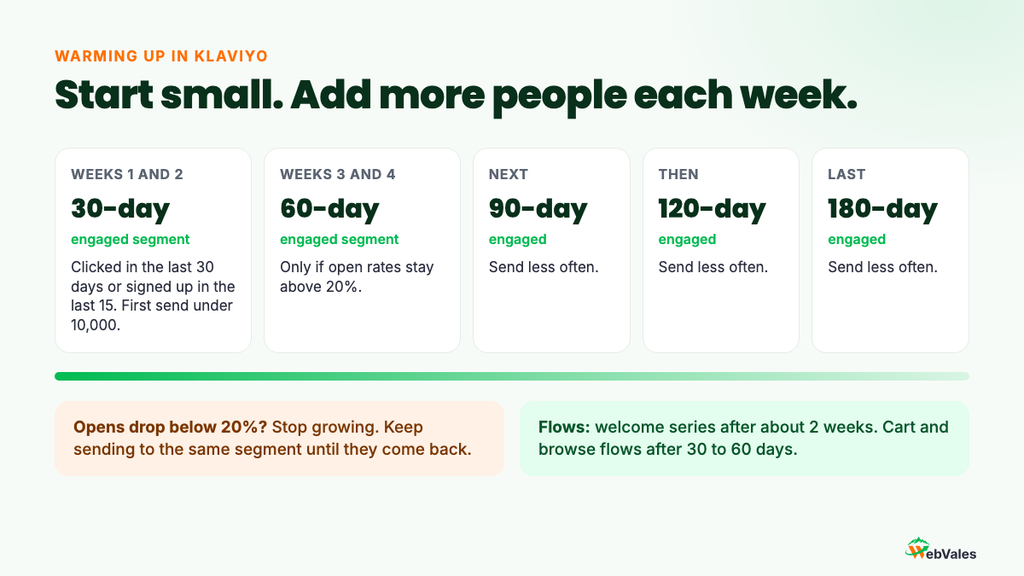
Warming up in Klaviyo
You need to warm up when you move to Klaviyo, set up a new sending domain, or start sending to far more people than before. That last one catches pet stores after a big giveaway. Here is Klaviyo’s standard warming plan:
- Weeks 1 and 2: send to your 30-day engaged segment (clicked in the last 30 days or signed up in the last 15). Keep the first campaign under 10,000 people.
- Weeks 3 and 4: if open rates stay above 20%, move to your 60-day segment.
- After that: 90, then 120, then 180 days, sending less often at each step.
- If open rates drop below 20%: stop growing until they come back.
Klaviyo suggests turning on abandoned cart and browse flows 30 to 60 days in. Most stores can’t go that long without cart flows. If you keep them on, check their numbers every day while you warm.
5 signs your reputation is slipping
- Bounces go up. Klaviyo removes hard bounces by itself. If bounces still rise, bad emails are getting in from bots, a giveaway or an upload.
- Spam complaints go up. Usually from mailing people who forgot you, like giveaway sign-ups or furniture buyers from two years ago.
- Unsubscribes go up. Often the first sign you’re sending too much. Spam complaints tend to follow.
- Every campaign drops at once. If one email does badly, blame the email. If they all drop together, the problem is where you’re landing.
- Your never-engaged group keeps growing. More dead weight means weaker results on every send.
Also compare results by inbox provider. If opens fall at Gmail but stay normal at Yahoo and Outlook, your Gmail reputation is the problem, not your content.
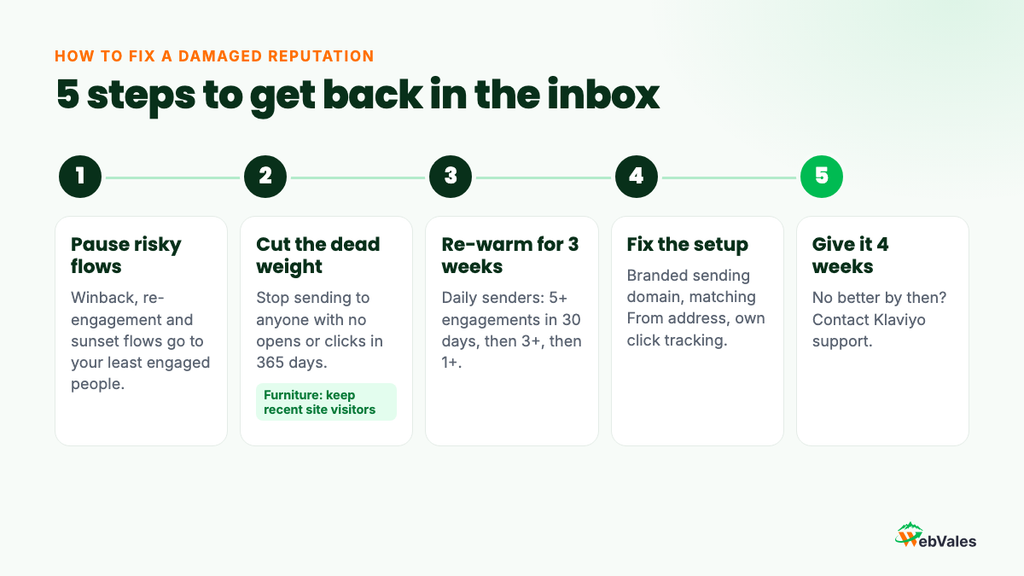
How to fix a damaged reputation
Here’s the short version of Klaviyo’s repair guide:
- Pause risky flows. Winback, re-engagement and sunset flows go to your least engaged people. Turn them off for now.
- Stop sending to anyone with no opens or clicks in 365 days. Furniture stores: keep anyone who visited your site recently, even without clicks.
- Re-warm for 3 weeks. If you send daily, week 1 goes to people with 5 or more engagements in the last 30 days, week 2 to 3 or more, week 3 to 1 or more. Weekly senders use the same steps over 180 days.
- Fix the setup. Branded sending domain, matching From address, dedicated click tracking.
- Give it time. If nothing gets better after 4 weeks, contact Klaviyo support.
Keep welcome, cart and post-purchase flows running if their numbers look good. For pet stores, reorder reminders to active buyers usually help too. These emails go to people who just did something, so they help your reputation.
A 15-minute weekly check
- Your Deliverability Hub score, and whether it went up or down.
- Bounce, unsubscribe and spam rates on each campaign against Klaviyo’s ranges.
- Your Gmail spam rate in Google Postmaster Tools.
- New sign-ups that look fake, especially after a giveaway.
- How far you are from your next big sale, and whether you’ve started ramping up.
- The size of your never-engaged segment. Suppress it once a month.
Get a free deliverability audit
Sender reputation isn’t something you fix once. It comes from who you email and how you email them, every week. A clever subject line can’t make up for a bad list or a broken setup.
If you run a pet or furniture store on Klaviyo and your opens or sales from email have dropped, let’s find out why. We’ll look at your sending setup, your segments, your numbers and your Gmail reputation, then tell you what to fix first.


